Filing an Article 14 Report
Audience. Whoever is on call when an actively exploited vulnerability or a severe security incident is confirmed. Read this before you need it, not during.
Outcome. Three filings made on time, each recorded with its ENISA reference and an immutable snapshot of exactly what was sent.
Why it matters. CRA Article 14 gives you 24 hours for an early warning and 72 hours for a full notification, from the moment you become aware. These are statutory deadlines and they apply from 11 September 2026.
Time required. The 24-hour filing takes about 15 minutes once the prerequisites in Steps 0 and 1 are done. Doing either of them during an incident wastes time you do not have, and Step 0 depends on a validation you do not control.
Read this first
The portal does not transmit anything to any authority.
It prepares your notification package and records what you filed. You take that package to ENISA's Single Reporting Platform, submit it there yourself, then come back and record that you did.
Anyone who assumes the app files on their behalf will watch a deadline pass while believing they complied. Every screen in this procedure states the two steps explicitly. Believe them.
The division of labour is:
- The portal does. Assemble the payload, validate the obligatory fields per stage, compute deadlines, freeze an immutable snapshot of what was generated, record the filing time and reference, and write the audit trail.
- You do. Log in to the ENISA SRP, submit the package, and record the reference the platform gives you.
Step 0. Get SRP access, before anything else
You cannot file without an account, and getting one is not instant.
On 20 October 2026 ENISA upgraded the SRP to version 1.2. The way a Primary AR invites a Secondary AR has changed. For a short period the SRP also accepts the earlier email method, which this procedure describes. ENISA is updating its guidance. Until it publishes the new steps, follow the instructions in the SRP itself and check the ENISA SRP page before you invite a backup representative.
- Create an EU Login account. The ENISA Single Reporting Platform authenticates through the European Commission's EU Login service at https://ecas.ec.europa.eu/cas/login. Use an individual account — not a shared or functional mailbox. A functional mailbox can support internal alerts and handover records, but it must not replace individual SRP identities unless current EU Login and SRP terms expressly permit it. This applies to manufacturers and to the authorised representatives of open-source software stewards alike. If you are a non-EU manufacturer filing through an authorised representative, that representative needs the account, not you.
- Primary and Secondary AR roles. When a notification is required, the first AR registration for a manufacturer creates the Primary AR role, subject to approval of the AR-to-manufacturer association by the designated CSIRT. The Primary AR can then invite a Secondary AR, who is assigned the AR Backup User role by the SRP. One AR account can represent multiple manufacturers and hold different roles for each. Under the earlier email method, invitations expire after seven days.
- Expect a validation step you do not control. ENISA states that the CSIRT designated as coordinator validates that a given representative may submit reports on behalf of a specific manufacturer. ENISA currently advises starting SRP registration and CSIRT validation when a notification is needed. Validation runs in parallel and does not block submission. Confirm individual EU Login accounts in advance so filing is immediate.
- Standardise the manufacturer identity. Manufacturer data is entered as free text on the SRP. Use the exact legal name and address as it appears on official registrations before you register. An inconsistency between your records and the SRP entry will cause mismatches when filing.
- There is no API. ENISA has confirmed that no application programming interfaces will be provided at this stage. Every filing is a person signing in and completing a form. Staff the 24-hour window accordingly, including out of hours.
- Draft ownership and role continuity. Draft notifications are visible only to the AR who created them. Additional Notes can also remain creator-specific. Assign one internal owner to each active draft to avoid gaps during handover. Ensure a named backup representative is prepared to support operational continuity if a primary representative is unavailable.
ENISA publishes registration and submission guidance on its Single Reporting Platform page.
Document your RACI and SRP readiness
Record your notification RACI assignments and operational readiness under Readiness.
- Early Warning Owner. Record the person responsible for the 24-hour notification.
- Full Notification Owner. Record the person empowered to escalate to leadership within 72 hours.
- Final Report Owner. Record the person who files the final remediation report.
- SRP Readiness Checks. Confirm EU Login credentials, assign primary and backup submitters, keep an offline notification worksheet locally, and record your tabletop exercise date.
- Awareness Procedure. Document the method used to record the timestamp when awareness first occurred.
- Annual RACI Review. Review and refresh named owners annually or upon staff departures.
Step 1. Configure the destination CSIRT, in advance
Open Settings, then the General tab, and find Establishment and Article 14 reporting.
Set your place of establishment. This determines the CSIRT that receives your notifications under Article 14(7).
Article 14(7) defines the main establishment.
For the purposes of this Regulation, a manufacturer shall be considered to have its main establishment in the Union in the Member State where the decisions related to the cybersecurity of its products with digital elements are predominantly taken. If such a Member State cannot be determined, the main establishment shall be considered to be in the Member State where the manufacturer concerned has the establishment with the highest number of employees in the Union.
Sales to EU customers are not part of this test. A company outside the EU, for example in the UK, with no EU establishment of that kind selects Not established in the EU.
- Established in the EU. Select the Member State of main establishment.
- Not established in the EU, with an authorised representative. Enter the representative's name, email and Member State. Article 18(1) reads "A manufacturer may, by a written mandate, appoint an authorised representative." Enter a representative only if you appointed one.
- Not established in the EU, no authorised representative. Leave the representative fields empty. Set CSIRT route (Article 14(7)) instead. See No authorised representative. Do not enter an importer or distributor as an authorised representative.
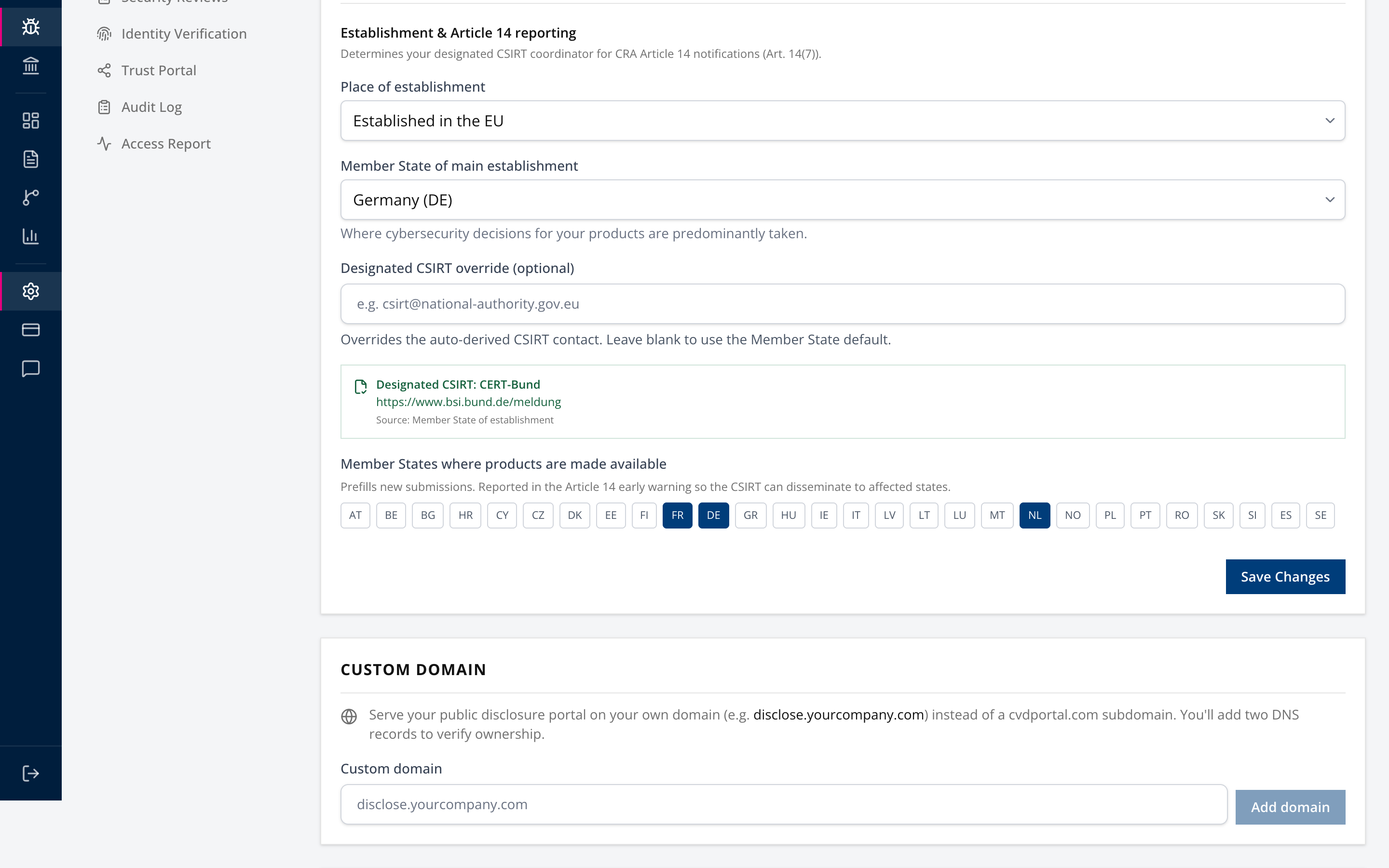
When it resolves, the panel names the CSIRT and shows the contact and how it was derived.
If it does not resolve, you get one of two warnings and they mean different things.
- "No designated CSIRT could be determined." You have not set a Member State. Set one.
- "We do not yet hold a CSIRT contact for XX." We have no record for that Member State. Enter your national CSIRT's Article 14 contact in the Designated CSIRT override field.
Until one of those is resolved, report generation is blocked outright. That is the single most likely thing to stop you at hour zero, and it takes two minutes to fix today.
While you are here, set Member States where products are made available. These prefill the early warning so the CSIRT can disseminate to the affected states.
Step 2. Start the clock on the right event
Two things reach this workflow.
A researcher report that turns out to be actively exploited. Open it in Submissions and set the classification in Step 3.
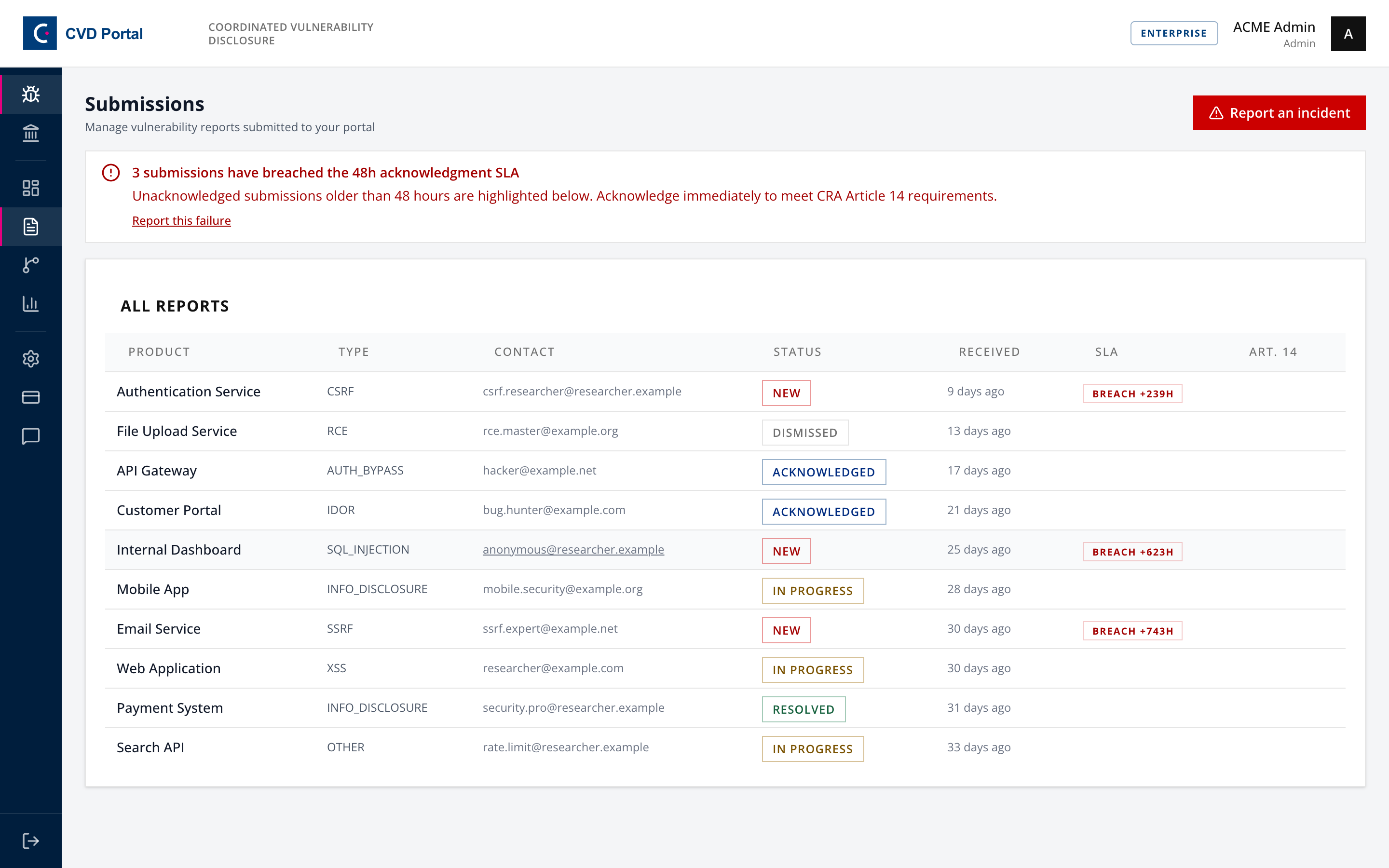
An incident you detect yourself. Use Report an incident on the submissions board.
To receive researcher reports under CRA Article 13 before an incident occurs, configure your public vulnerability disclosure platform and publish an RFC 9116 contact file with the security.txt generator. Intake received through your portal links directly to this Article 14 reporting procedure.
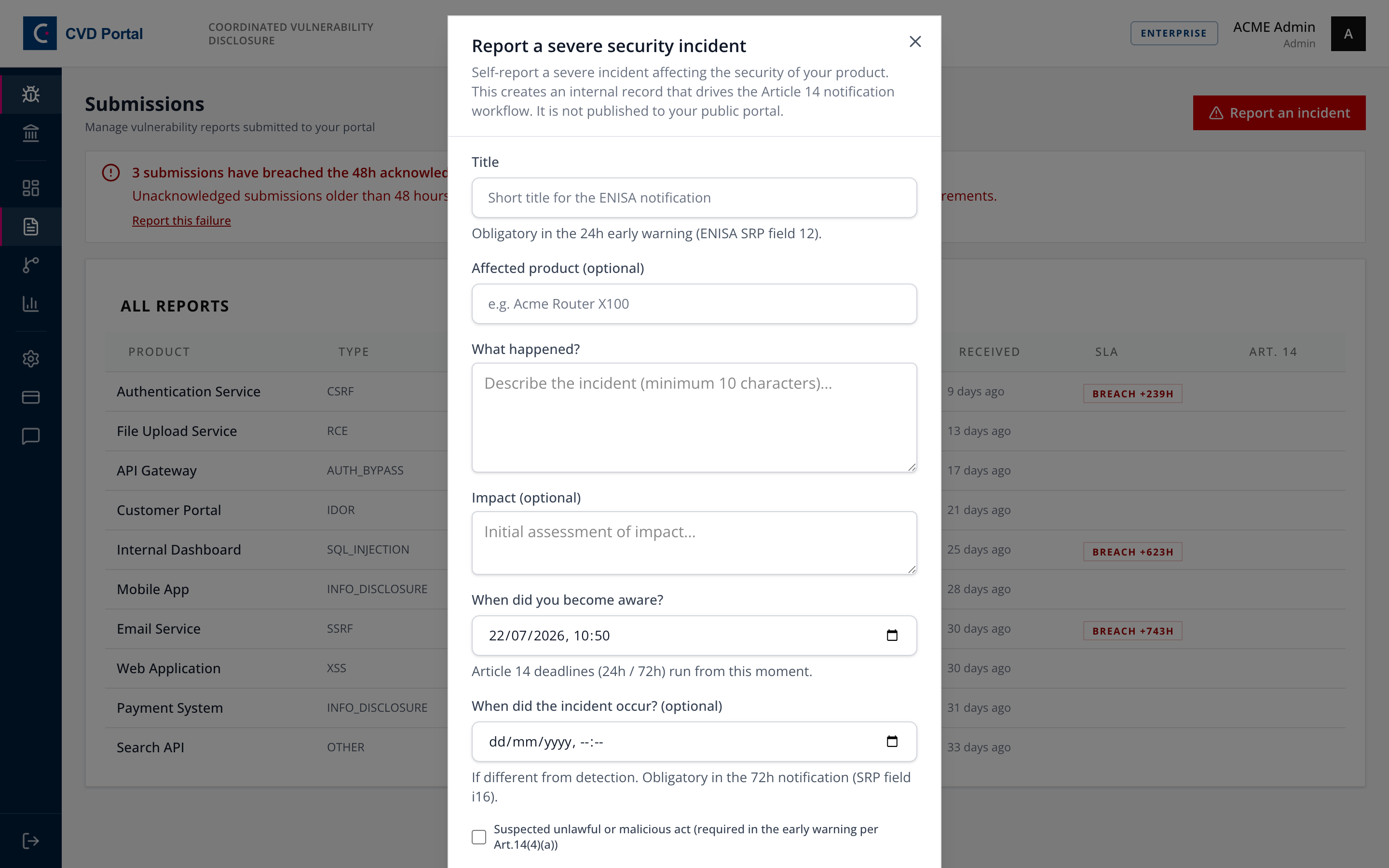
The field that matters most here is "When did you become aware?". Article 14 deadlines run from that moment, not from when you opened the form. Record it accurately even if it is embarrassing.
Tick "Suspected unlawful or malicious act" if applicable. It is required in the early warning under Article 14(4)(a).
Step 3. Classify, which is what triggers the obligation
Open the submission and find Severity & Art.14 Obligations.
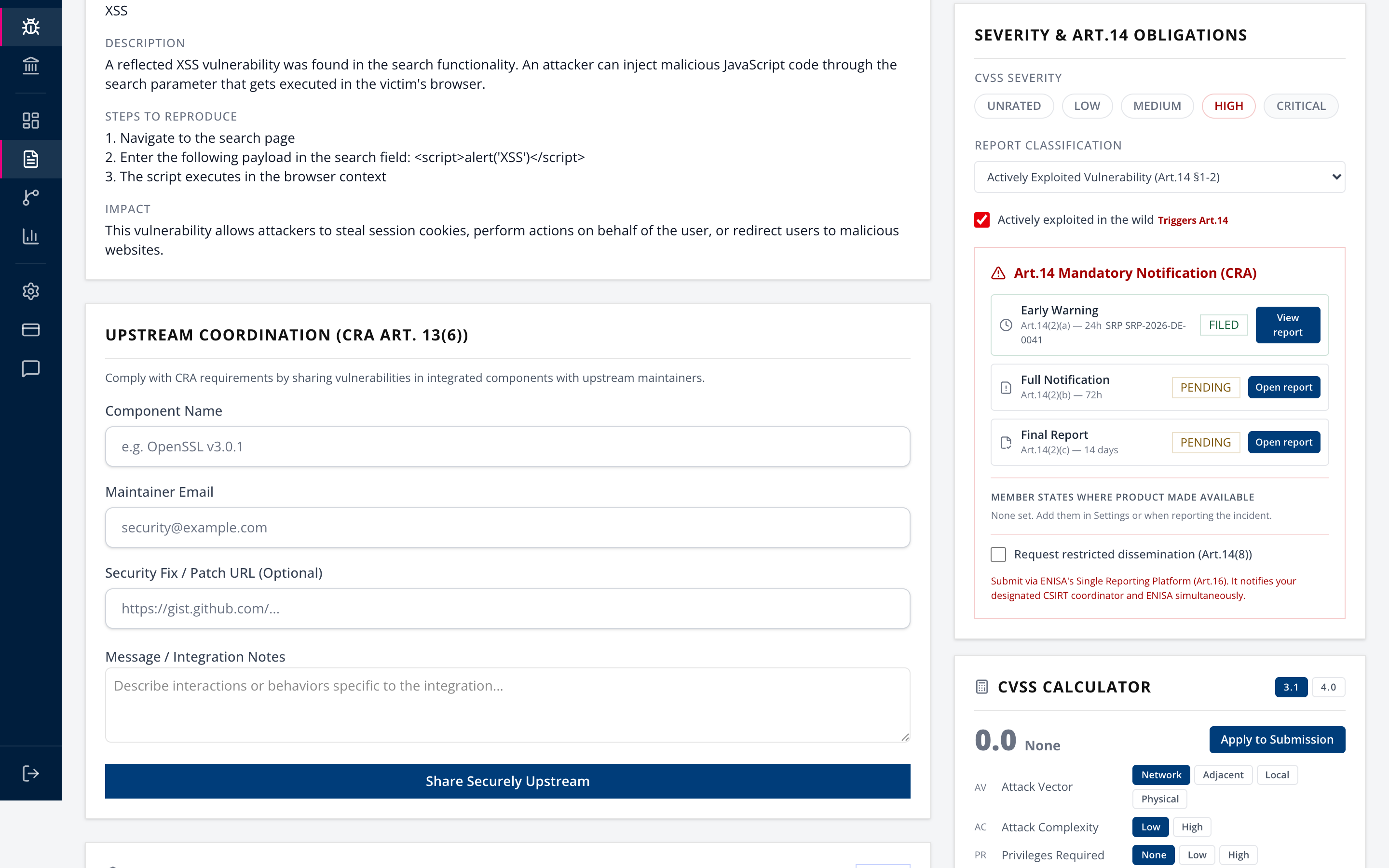
Set Report classification to one of:
- Actively Exploited Vulnerability (Art.14 §1-2)
- Severe Security Incident (Art.14 §3-5)
- Both
For a vulnerability, tick "Actively exploited in the wild". The panel marks it Triggers Art.14. Nothing generates until this is set, and the block is deliberate: Article 14 applies to actively exploited vulnerabilities, not to every report you receive.
For an incident, severity must be HIGH or CRITICAL. Article 14 incident reporting covers severe incidents only.
Once it triggers, the three stages appear with their deadlines and a countdown.
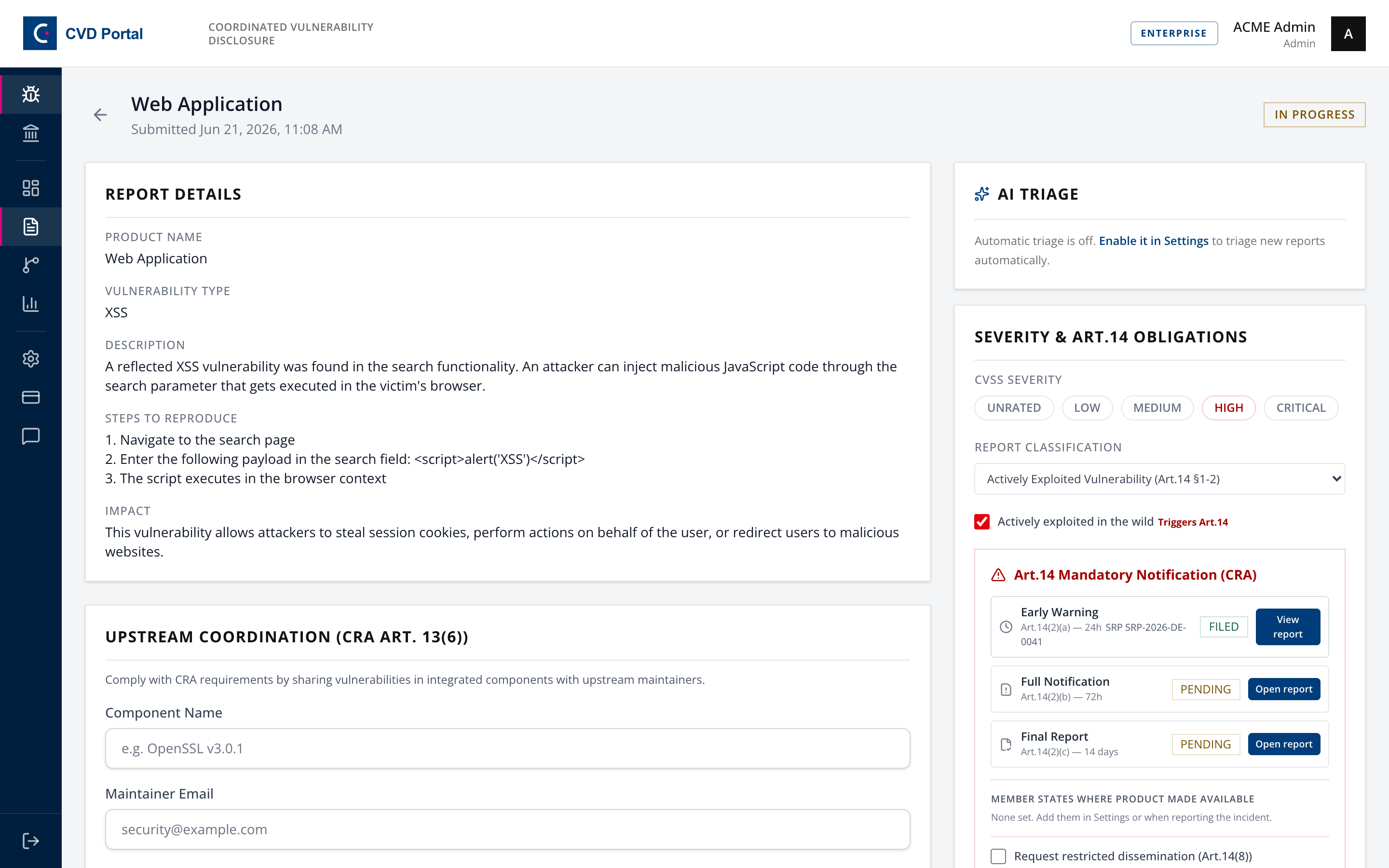
| Stage | Article | Deadline |
|---|---|---|
| Early Warning | 14(2)(a) or (4)(a) | 24 hours |
| Full Notification | 14(2)(b) or (4)(b) | 72 hours |
| Final Report | 14(2)(c) or (4)(c) | 14 days (vulnerability) or 1 month (incident) |
The incident final report uses a calendar month, per Regulation 1182/71 Article 3(2)(c), so the same day of the following month. It is not 30 days.
Enterprise AI triage suggestions (Opt-in)
Organizations on the Enterprise plan can enable opt-in AI triage in settings.
When enabled, the system analyzes new vulnerability reports and generates suggestions:
- Suggested severity level
- Suggested vulnerability type
- CVSS 3.1 vector string and score
- Plain-language summary
- Possible duplicate reports
- Article 14 reporting risk with a rationale
Mandatory human review:
- AI suggestions never change human decision fields automatically.
- AI suggestions never start an Article 14 reporting clock.
- Responders must review, verify, and manually apply all suggestions.
- The manufacturer retains full responsibility for engineering decisions, legal judgements, and authority filings.
Step 3b. Link the CRA product
On the same submission page, find the CRA product panel and select the product this report concerns.
The link matters because the ENISA SRP asks for the product type and its Annex III/IV category, which is exactly the classification you already made in the CRA workspace. With a product linked, both fields fill themselves on every stage of the report, and nobody re-derives the tier from memory while a 24-hour clock runs.
Some links are made for you. A researcher submission whose product name matches exactly one active product is linked at intake. Anything ambiguous is left unlinked, because a reporter's free-text product name is not authoritative about which of your product records is affected. When no product carries the reported name, the panel offers to create it with the name already filled in, and a new product needs its class confirmed before it fills either field. Only an admin can set or change the link.
Nothing is copied onto the report. The product stays the single source of truth, so reclassifying it updates any draft you have not generated yet. Once a stage is generated, its snapshot holds what you actually filed.
Three cases are worth knowing:
- You can still override the type on the report. If it then disagrees with the linked product, the drawer says so and the generated package carries a warning naming both values.
- Only a confirmed classification is inherited. If nobody has decided the product's Annex III/IV class yet, nothing is inherited and the drawer tells you. This report goes to ENISA in your name, so an unreviewed class must not ride along in it. Confirm the classification on the product, or set both fields on the report by hand.
- If the linked product is classified as important or critical but has no Annex III/IV category recorded, nothing is inherited and the drawer tells you. This is deliberate. Inheriting a tier without its category would make field 10 obligatory with nothing to fill it, and a missing category must never be the reason an early warning cannot be generated. Record the category on the product, or set both fields on the report.
In every one of these cases, linking can fill fields but never withholds the package. A classification problem is never the reason a 24-hour early warning cannot be generated.
Step 4. Draft the early warning
Select Open report on the Early Warning row.
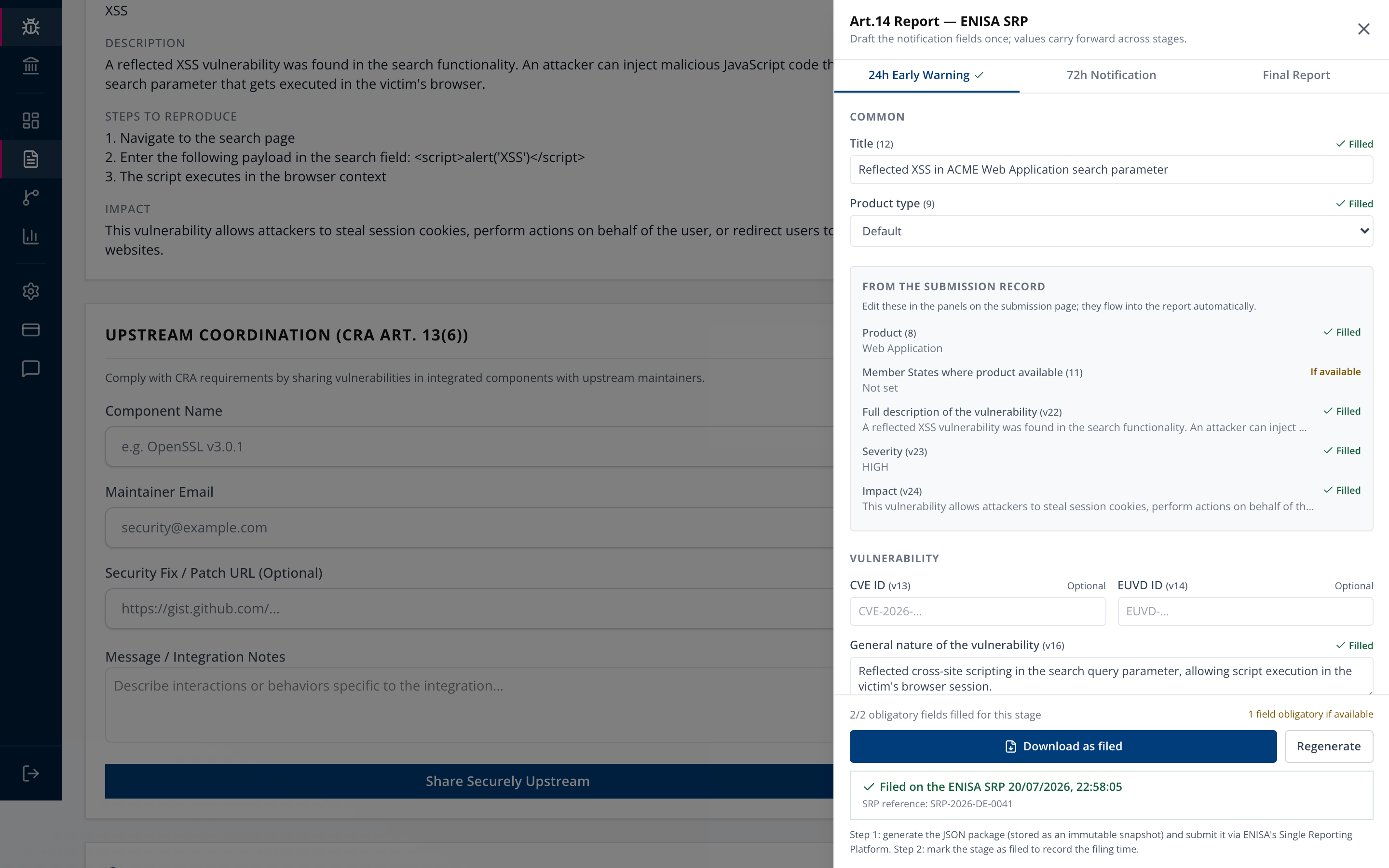
The drawer has a tab per stage and one shared draft. Fill a field once and it carries forward.
Fields marked REQUIRED block generation for that stage. Fields marked If available only warn. The footer keeps a running count, so "1/2 obligatory fields filled for this stage" tells you exactly where you are.
From the submission record lists values pulled from the submission itself, each marked Filled or not. Those are not editable here. Change them in the panels on the submission page and they flow through.
The 24-hour stage needs very little: a title, and the product, which comes from the submission. That is deliberate. The early warning exists to raise the flag fast, not to explain everything.
Product type and Product category (SRP fields 9 and 10) fill themselves from the CRA classification when the submission is linked to a product whose classification has been confirmed. See Step 3b. Otherwise you pick both by hand.
Step 5. Generate the package
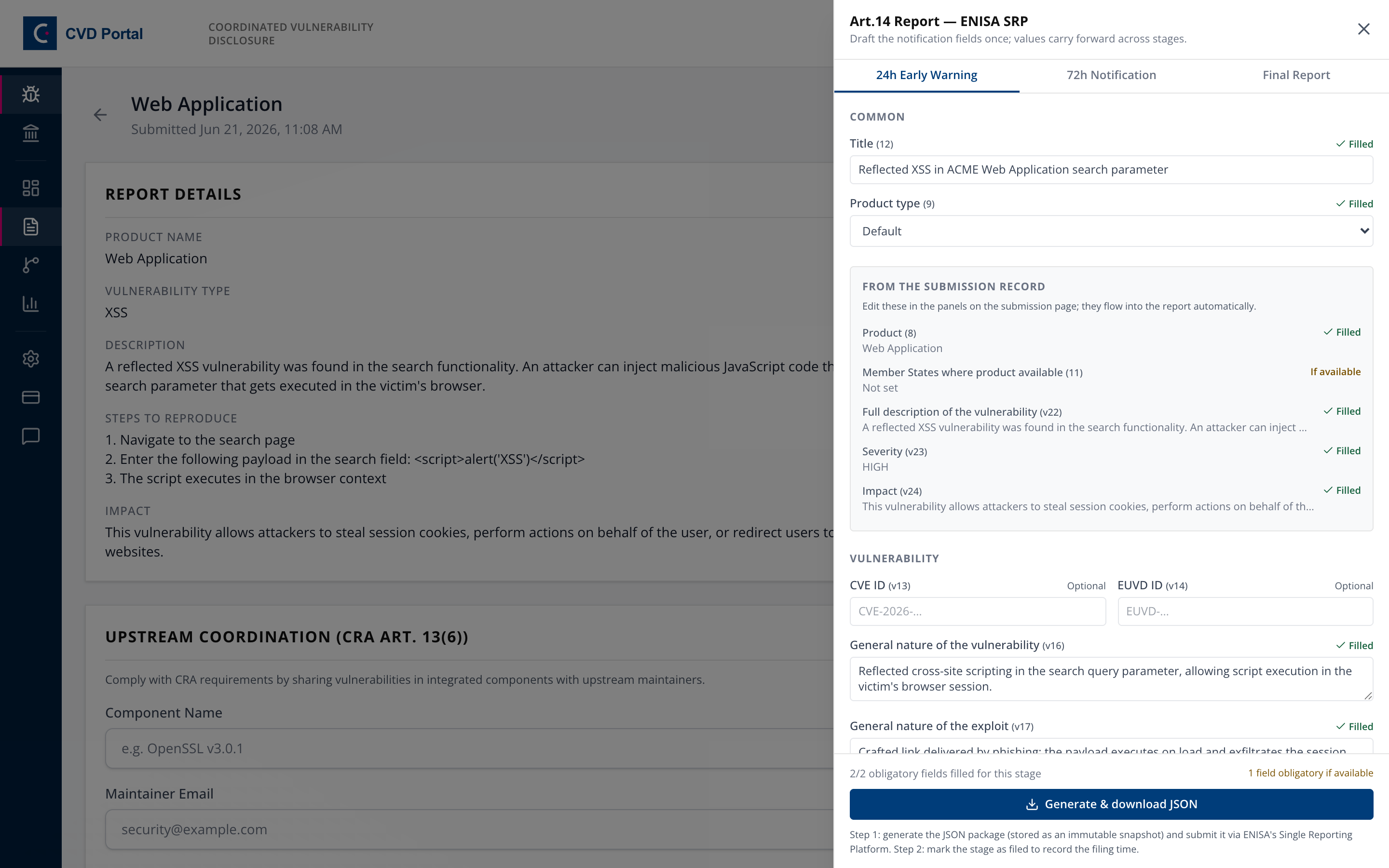
With the obligatory fields filled, select Generate & download JSON.
Two things happen. A JSON file downloads. An immutable snapshot is stored, so what you filed is provable later.
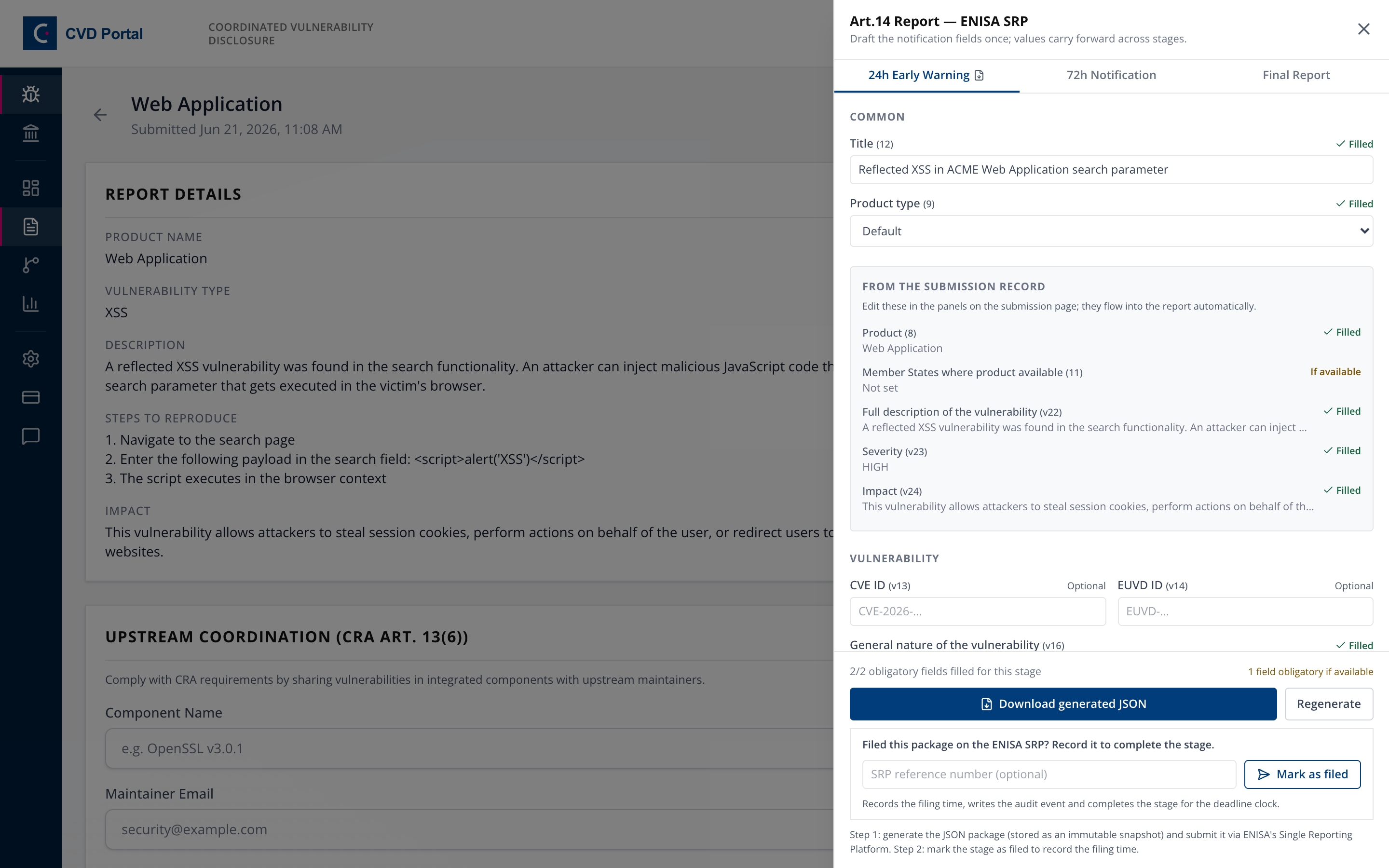
Re-downloading returns the original snapshot byte for byte. Regenerate creates a new one, and you should only use it if the assessment genuinely changed before you filed.
Step 6. File it on the ENISA SRP, yourself
Take the downloaded JSON to ENISA's Single Reporting Platform at https://portal.cra-srp.enisa.europa.eu and sign in with the EU Login account from Step 0, then submit it there.
This is the step the portal cannot do for you. Nothing has reached any authority yet.
The platform notifies your designated CSIRT coordinator and ENISA simultaneously under Article 16.
Step 7. Record the filing
Return to the drawer. Under "Filed this package on the ENISA SRP? Record it to complete the stage", enter the reference the platform gave you and select Mark as filed.
This stamps the filing time, writes the audit event, and stops the clock for that stage.
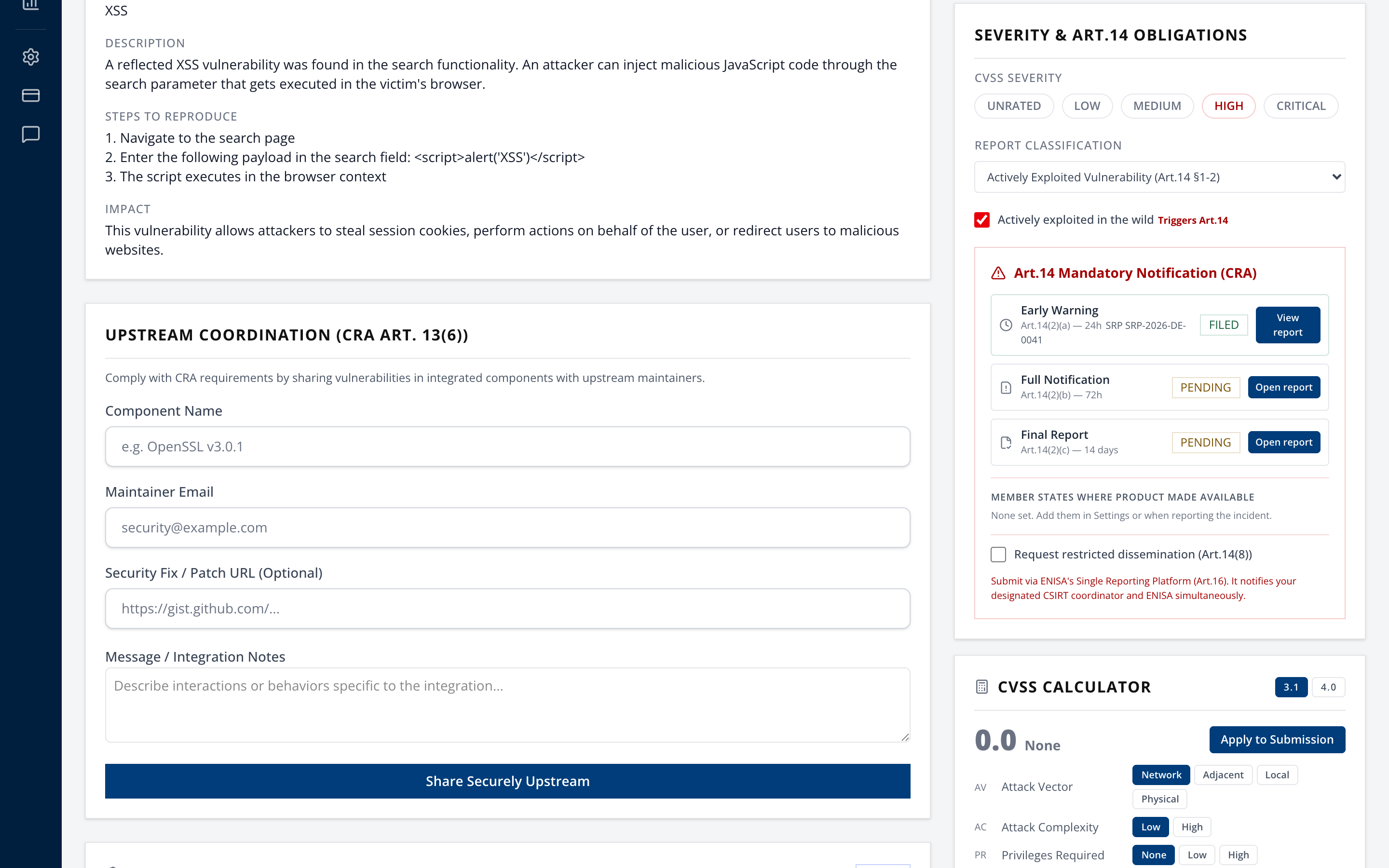
The stage now shows FILED with its reference. The others stay PENDING with their own clocks.
Record the reference even though the field is optional. It is the only link between your evidence and the authority's record of receipt.
Step 8. The 72-hour notification
Same drawer, 72h Notification tab.
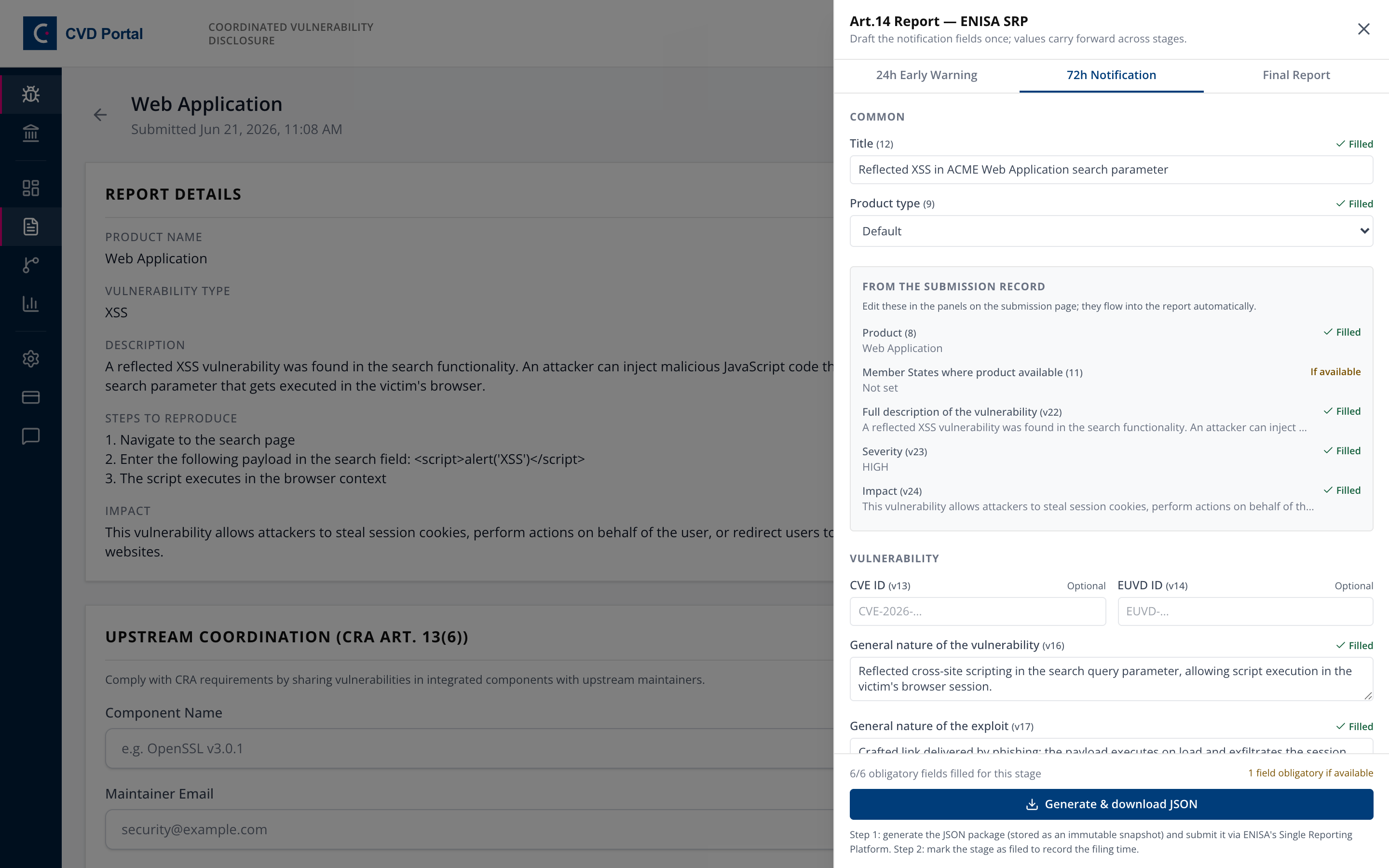
This stage requires substance the early warning did not. For a vulnerability, the nature of the vulnerability and the exploit, corrective measures taken, and measures users can take. For an incident, the nature of the incident, when it was detected and occurred, and an initial assessment.
Then repeat Steps 5 through 7. Generate, file on the SRP, mark as filed.
Step 9. The final report
Same drawer, Final Report tab.
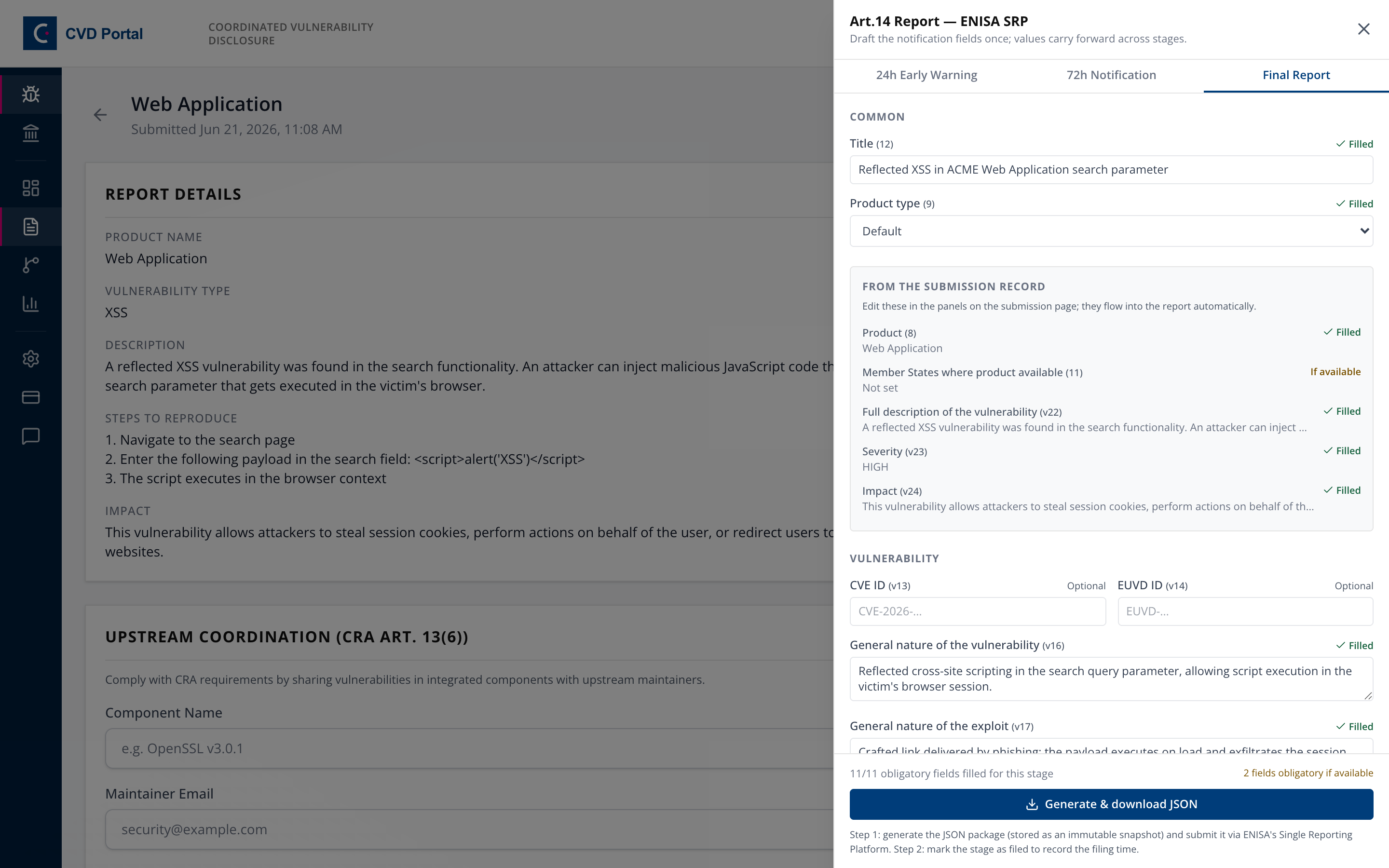
For a vulnerability the clock starts when a corrective measure becomes available, so set "Date corrective or mitigating measure available". Until that date exists the final report deadline stays pending rather than counting down.
Then Steps 5 through 7 once more.
Step 10. Restricted dissemination, where justified
If wider circulation would make things worse, tick Request a delay in dissemination (Art.16(2)) in the Severity & Art.14 Obligations panel and give a justification.
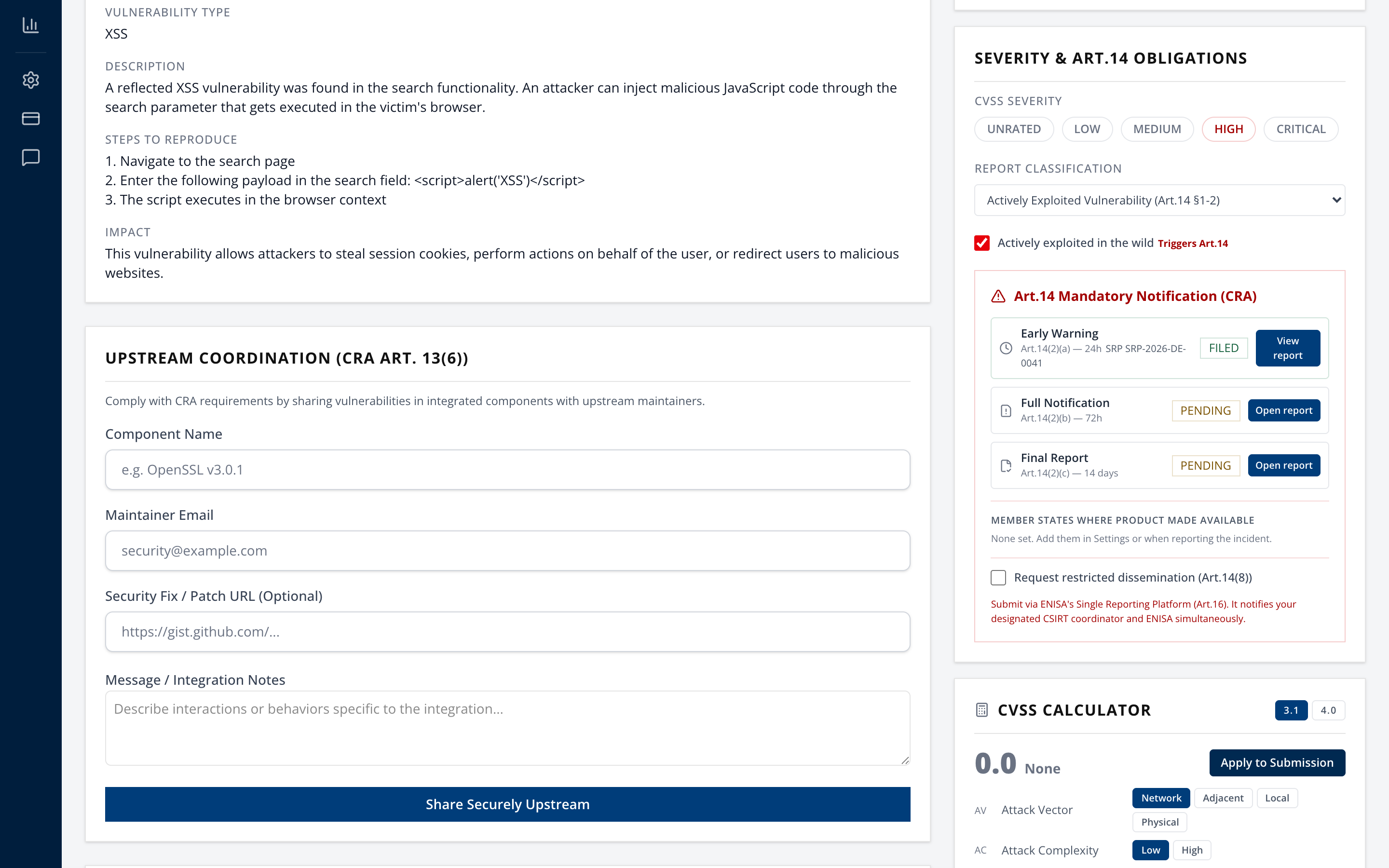
This is a request to the authority under CRA Article 16(2), not a switch you control. Use it where immediate dissemination would increase cybersecurity risk, and say why.
Step 11. Human-readable record, optional
Generate ENISA Report produces a markdown document covering manufacturer details, CSIRT routing basis, timeline and an SRP filing checklist.
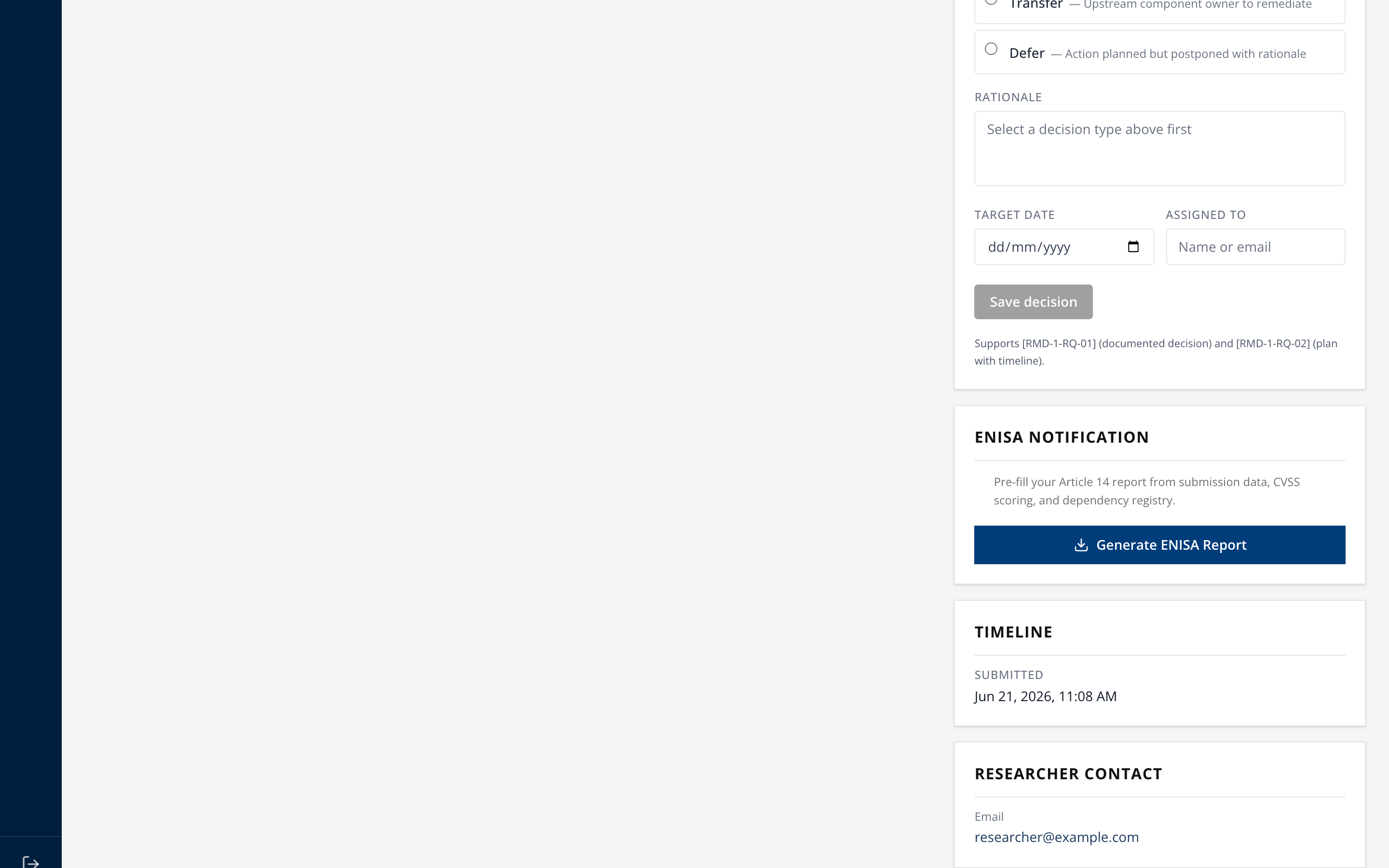
Useful for a management briefing or a legal file. The JSON package is what you actually submit.
The Article 14 guide in the portal
The Readiness page and each submission page show "Article 14 reporting, step by step". It has 13 steps, in the order you meet them. Each step gives the duty in plain words, the deadline, the evidence that shows it, how to check it, where manufacturers usually fall short, and the sources. The sources are the regulation, Commission guidance C(2026) 5252 points 209 to 221, and the Commission FAQ.
Each step also states how far CVD Portal records it. 12 steps are recorded and 1 partly.
- CSIRT selection (Art 14(7)), partly. Settings finds the CSIRT from your main establishment, your authorised representative, or, with neither, the importer, distributor or users step you record. Which Member State holds most of your importers, distributors or users is your determination.
Is the incident severe? Article 14(5)
For a security incident, the submission asks the two Article 14(5) questions under Is the incident severe?
- (a) Does it affect, or can it affect, the product's ability to protect the availability, authenticity, integrity or confidentiality of sensitive or important data or functions?
- (b) Did it lead, or can it lead, to malicious code in the product or in a user's network and information systems?
Answer each with Yes, No or Not yet assessed.
- Either answer Yes. The incident is severe and the reporting clock runs, whatever the severity rating.
- Both answers No. The incident is not severe. The reporting phases are hidden and no deadline alerts are sent. You can still report under Article 15.
- Not both answered. An incident rated HIGH or CRITICAL is treated as severe, so a 24-hour deadline is never missed while you assess.
Recording an answer is an Article 14 decision and is written to the audit log. The answers also fill the severity fields (SRP i21 and i22) of the final report when the report draft leaves them empty.
Intermediate report on request, Article 14(6)
The CSIRT that received your notification can ask for a status update at any time. Under Intermediate report, Art.14(6) on the submission, record the date of the request. When you have answered on the SRP, record the date and the SRP reference. A request with no answer shows "Requested and not yet answered". You cannot record a sent date before a request date.
No authorised representative, Article 14(7)
A manufacturer with no main establishment in the EU and no authorised representative sets CSIRT route (Article 14(7)) in Settings. Choose the first step you can determine, in this order.
- The Member State of the importer placing most of your products on the market.
- The Member State of the distributor making most of them available.
- The Member State where most of your users are.
Then choose that Member State. The designated CSIRT and its source show below the form. With the users step, you may keep reporting later events to the CSIRT you first reported to.
Completion checklist
Per submission that triggers Article 14.
- Individual EU Login accounts created and named backup representative identified
- Establishment and Member State set, and a designated CSIRT resolved
- Standardized manufacturer identity verified against legal records
- Designated draft owner assigned for the active filing
- SRP registration and CSIRT association validation initiated in line with current ENISA guidance
- "When did you become aware?" recorded accurately
- Report classification set, and Article 14 confirmed as triggered
- CRA product linked and its classification confirmed, so the SRP product type and category come from it
- Early warning generated, filed on the SRP, and marked as filed within 24 hours
- SRP reference recorded for the early warning
- 72-hour notification generated, filed, and marked as filed
- Corrective-measure availability date set once known
- Final report generated, filed, and marked as filed
- Restricted dissemination requested where justified under Article 16(2)
- Audit log reviewed, showing generation and filing for each stage
What blocks generation
In the order the checks run, so you can diagnose from the message alone.
| Message | Cause |
|---|---|
| The SRP-ready submission package is a Reporting feature | Package generation needs the Reporting (Pro) plan or higher |
| Art.14 reporting only applies to actively exploited vulnerabilities or severe security incidents | Classification not set, see Step 3 |
| Art.14 incident reporting applies to severe incidents only | Incident severity below HIGH |
| No designated CSIRT is configured | Member State not set, see Step 1 |
| No CSIRT contact is on record for XX | Member State has no record, use the override |
| Obligatory ENISA SRP fields are missing for this reporting stage | Fields listed in the drawer are unfilled |
| Generate the report package for this stage before marking it as filed | Filing attempted with no snapshot |
Plan differences worth knowing before an incident
- Free. No deadline banner, no board badge, no package generation. Not viable for Article 14.
- Reporting and above. Package generation, deadline banner, board countdown badge, and automated deadline alerts by email and webhook, plus a breach alert. The alert comes 6 hours before the early warning deadline, 12 hours before the 72-hour notification deadline and 72 hours before the final report deadline.
- Enterprise. Adds opt-in AI-assisted triage suggestions.
On the Free plan, nobody gets told automatically. Somebody has to be watching.