How do I manage billing for partner clients?
Partners manage client billing from the Clients list in the Partner Console. Client direct billing lets the client select a subscription. Partner invoicing lets the partner assign a client tier when wholesale pricing is configured.
Key takeaways
- Agree billing with the client before a plan change.
- Check the correct client row before changing billing.
- Client administrators manage subscriptions under Client direct billing.
- A saved billing change can require support if the wholesale update fails.
Last updated 5 October 2026.
Screenshots use test data captured on 4 and 5 October 2026. Click a screenshot to open the full image.
Before you start
Use your partner ADMIN account. Confirm the agreed billing mode, plan, and effective change date with the client. Check whether your partner account has wholesale pricing configured.
Step 1. Check the current client plan
- Open the Partner Console.
- Click
Clients. - Find the client by company name and workspace identifier.
- Read the
Plancolumn. - Read the
Billingselector. - Record the current plan and billing mode in your project record.
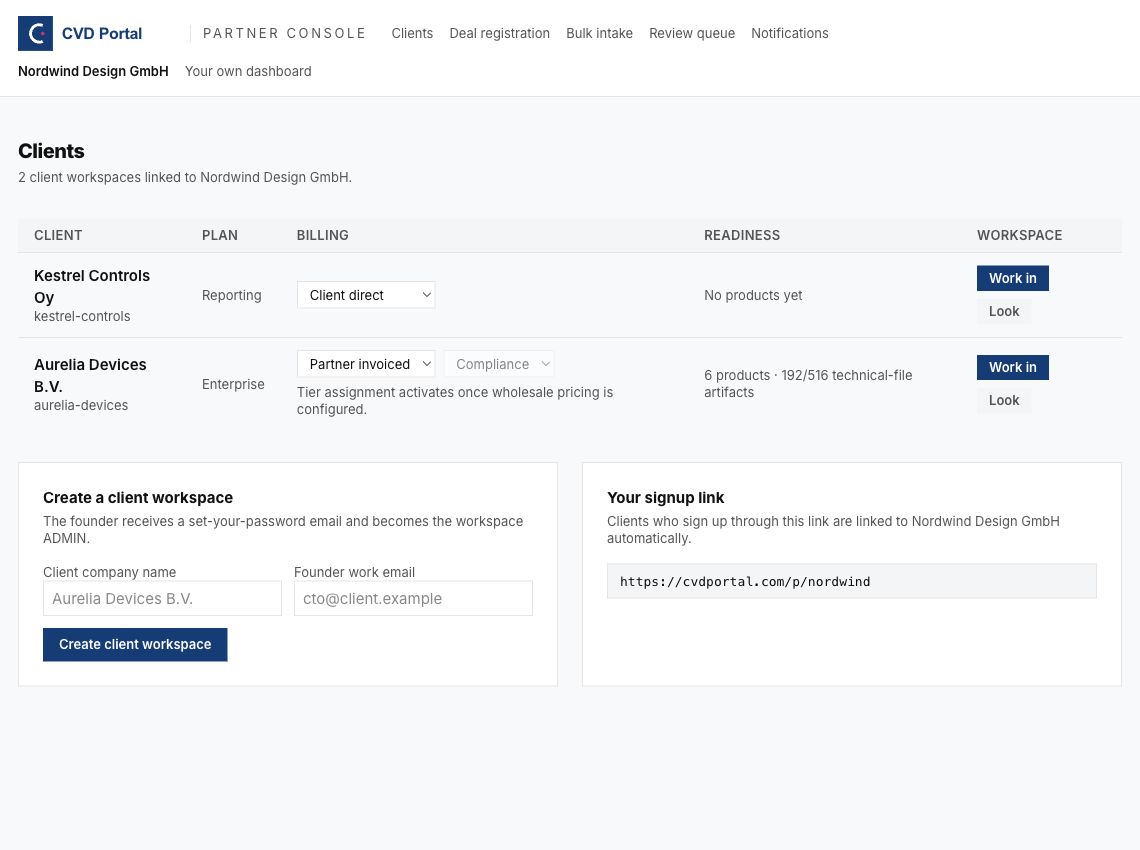
Figure 1. Check the client row before using either billing selector.
Step 2. Select the billing mode
| Mode | Payer | Plan control |
|---|---|---|
| Client direct | Client. | Client billing page. |
| Partner invoiced | Partner. | Client tier selector in the partner console. |
Client direct billing
- Open
Billing modein the client row. - Select
Client direct. - Wait for the change to complete.
- Check for an error under the selector.
- Reload
Clients. - Check the saved billing mode and plan.
- Ask the client administrator to open the client billing page.
- Ask the client administrator to select the agreed subscription.
- Reload
Clientsafter the client confirms the subscription change. - Check the displayed plan.
Changing from partner billing can return the client to Free when the client has no live subscription. Check feature access before you schedule further product work.
Partner invoicing
- Open
Billing modein the client row. - Select
Partner invoiced. - Wait for the change to complete.
- Check for an error under the selector.
- Open
Client tier. - Select the agreed tier.
- Wait for the change to complete.
- Reload
Clients. - Check the saved billing mode and plan.
| Tier selector | Plan name |
|---|---|
| Free | Free. |
| Reporting | Reporting. |
| Compliance | Compliance. |
Partner invoicing requires configured wholesale prices. Paid client tier changes update the quantities used for the partner subscription. Use the Partner program reference and your agreement for invoice terms.
An Enterprise client can show Enterprise in the Plan column while the tier selector displays Compliance. Contact support before changing an Enterprise arrangement.
Step 3. Check feature access
- Open the client with
Work in. - Check the consultant banner.
- Open the product task that the plan must support.
- Check for a plan access message.
- Return to your own workspace.
- Ask the client administrator to check the client billing page when required.
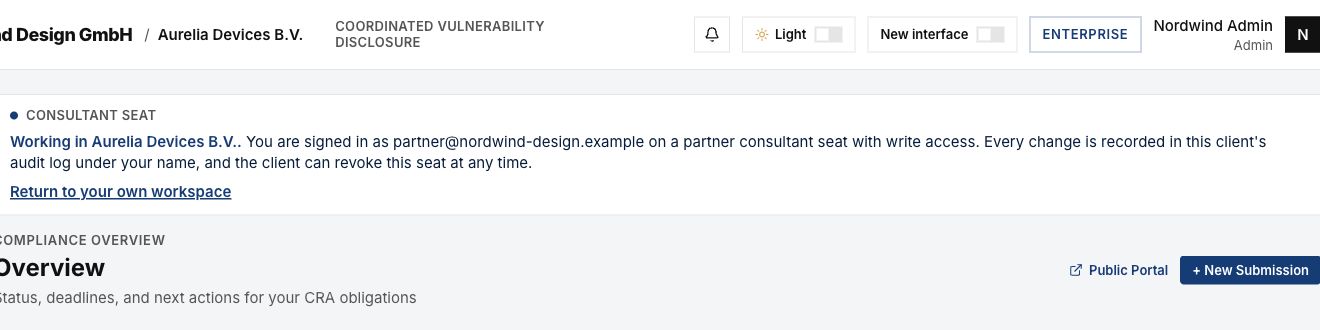
Figure 2. A consultant seat can check product work but cannot manage client checkout.
Step 4. Resolve a saved change with an error
A message can report that the plan or billing mode was saved but the wholesale update failed.
- Copy the error message into a private support request.
- Reload
Clients. - Record the saved billing mode and plan.
- Ask support to check the wholesale subscription update.
- Check the client row again after support confirms the result.
A success message for the saved plan does not confirm that the partner invoice update completed. Keep the support task open until the billing result is checked.
Common problems
| Problem | Corrective action |
|---|---|
| Client tier is disabled. | Check wholesale setup with support. |
| The client pays directly and you cannot set a tier. | Ask the client administrator to use the client billing page. |
| The client returns to Free. | Check the client subscription after changing billing mode. |
| The plan was saved but the wholesale update failed. | Reload the row. Ask support to check the saved change and invoice quantities. |
| A client feature is blocked. | Check the effective plan and trial state before work resumes. |
Recommended practices
- Keep written client approval for billing changes.
- Check the saved row after each change.
- Schedule a billing change with the client administrator available.
- Record invoice questions separately from product review tasks.
Completion checklist
- Client approval recorded.
- Billing mode checked after reload.
- Client plan checked after reload.
- Required feature access checked.
- Wholesale errors resolved when applicable.
- Client informed of the result.