How do I onboard a client as a partner?
Partners onboard clients through the Partner Console by creating a client workspace or sharing a partner signup link. Client onboarding includes account activation, billing selection, consultant access checks, document review, and a handover to the client administrator.
Key takeaways
- The client administrator owns the client workspace.
- The partner can create a workspace or let the client register through the partner signup link.
- The client must activate the account before the public disclosure portal opens.
- The partner must check the client name before each change or document dispatch.
- Uploaded documents require review in the client workspace after dispatch.
Last updated 1 November 2026.
Partner manuals · Manual 1 · Client onboarding
Before you start
Use an ADMIN account for the company that owns the partner account. Confirm that the CVD Portal team has enabled the partner account.
Prepare the following information with the client.
- The client company name.
- The work email of the person who will own the client workspace.
- The agreed billing mode and plan.
- The products covered by the work.
- The documents that the client has approved for upload.
- The person who will review the product information and evidence.
Use the client's work email for the client administrator. The email domain determines the disclosure portal address. Check the email before you create the workspace.
Screenshots use test data captured on 4 and 5 October 2026. Follow the control names in the steps. Click a screenshot to open the full image.
What your clients see
Your clients see your name on the dashboard, the public portal, email, badges and generated documents. They do not see the CVD Portal name or logo. Some places still show CVD Portal or Porta Regulus B.V.
- Email shows your name as the sender. The address is
noreply@cvdportal.comuntil we verify your portal domain. Then it isnoreply@<your portal domain>. This also applies to the email that a client sends to a researcher or to the maintainer of an upstream component. - Clients sign in and work on
cvdportal.com, and links in email point there. - Invoices name Porta Regulus B.V. when the client pays CVD Portal directly. EU VAT law requires the supplier name. Use partner billing to remove it.
- Your data processing terms with the client must name Porta Regulus B.V. as a sub-processor.
- Clients accept the CVD Portal Terms of Service and Privacy Policy.
- The signed evidence pack on the trust portal names Porta Regulus B.V. as the signer.
- The page source of every page holds structured data that names CVD Portal and Porta Regulus B.V. A visitor does not see it on the page.
Your clients get no links to the CVD Portal documentation or to the CVD Portal website. Plan and upgrade links open the Billing page. The support chat answers in your name and gives no links to the documentation.
Until we verify your own portal domain, client portals use <slug>.cvdportal.com and badge links point to cvdportal.com. Email support@cvdportal.com to set up your portal domain.
When you set up your portal domain, we send you two groups of DNS records. One group is for the client portals and one is for email. Add all of them. We verify the portal domain only when the email records also pass, so your clients never get email from cvdportal.com after the switch.
After we verify your portal domain, your clients get these changes.
- Client portals use
<slug>.<your domain>. - New badge code links to the verification page at
<slug>.<your domain>/verify. The badge image also loads from your domain. Clients find the badge code under Settings and on the Reporting Channel page. - The verification page and the attestation letter show your name and your portal header. They do not show CVD Portal.
- Badge code that a client pasted before still works. A visitor who clicks it goes to the verification page on your domain. Your clients do not have to change their website.
Step 1. Open the client list
- Sign in to your partner account.
- Open the Partner Console.
- Click
Clientsin the top menu. - Check the partner name in the header.
The client list shows the plan, billing mode, readiness, and workspace controls for each linked client.
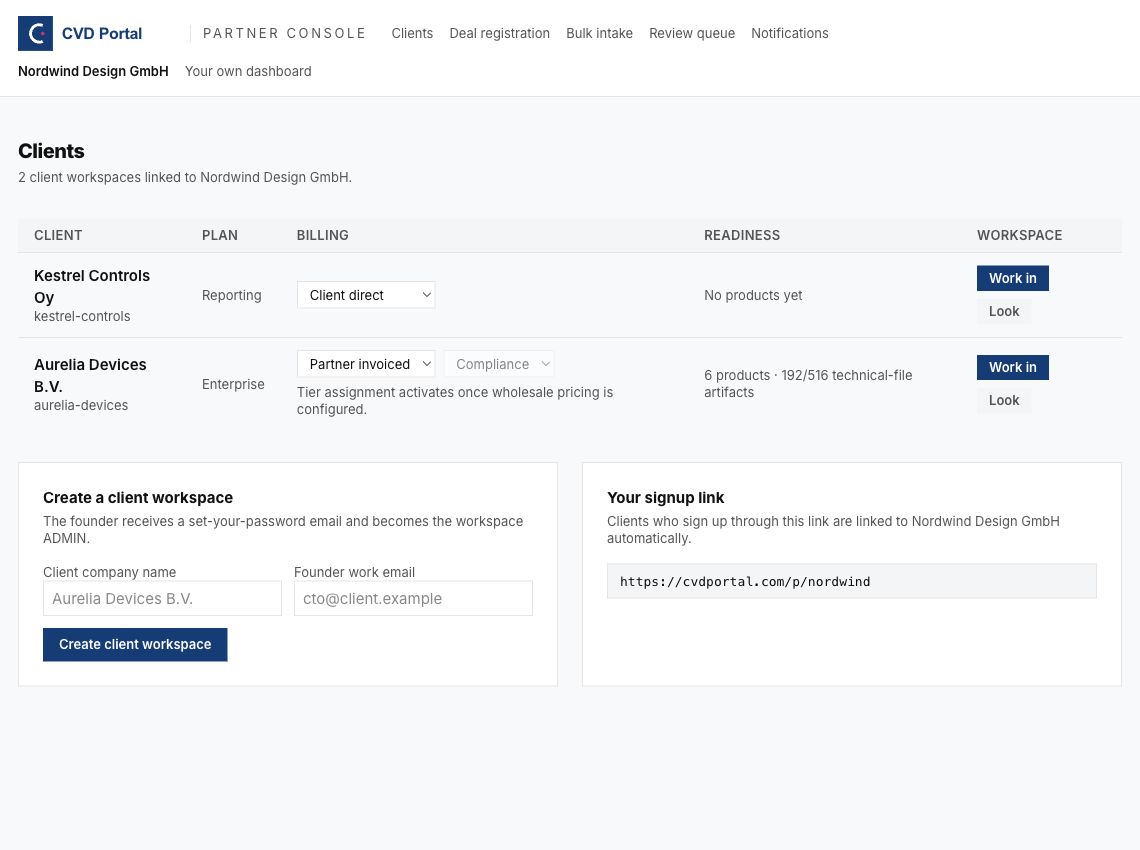
Figure 1. Use the top menu to open Clients. Use the Workspace column to enter a client workspace.
If the console sends you to your dashboard, check that you use an ADMIN account for the partner company. Ask CVD Portal support to check partner setup if the account is correct.
Step 2. Select the account creation method
Select one method for each new client.
| Method | Use when | Partner action | Client action |
|---|---|---|---|
| Create a client workspace | You have the approved company name and administrator email. | Enter the client details in the console. | Set a password through the activation email. |
| Partner signup link | The client wants to create the account. | Copy the link from the console. | Open the link and complete registration. |
For a client with an existing account, ask the client to sign in. Ask CVD Portal support to check the partner link if the workspace is missing from your client list.
Method A. Create a client workspace
- Find
Create a client workspacebelow the client list. - Enter the approved name in
Client company name. - Enter the client's administrator email in
Founder work email. - Check both fields with the client.
- Click
Create client workspace. - Wait for the workspace creation message.
- Find the new client in the client list.
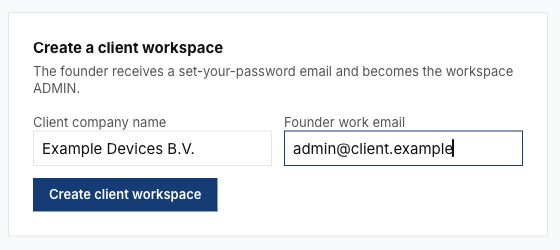
Figure 2. Enter the client details in the creation form. The values shown are test data.
The system creates a client workspace and an ADMIN account for the client. The system sends an activation email to the address you entered. The new workspace uses the billing default set for your partner account. Check the billing mode in Step 4.
If the email already has an account, the system rejects creation. Follow the existing account procedure above. Use a work email if the system rejects a public email provider.
Method B. Share the partner signup link
- Find
Your signup linkbelow the client list. - Select the full link.
- Copy the link.
- Give the link to the client administrator.
- Ask the client to open the link.
- Ask the client to check the partner name on the signup page.
- Ask the client to click
Create your account. - Ask the client to complete registration and any email verification step.
- Open
Clientsto check that the client workspace appears.
Figure 3. Copy the link from your own console. The link in the screenshot belongs to the test partner.
Use the full partner link for registration. The partner signup page connects the new client account to your partner account. If the client uses the general registration page, check the partner link with support before you create another account.
Step 3. Check client activation
For a workspace created through Method A, ask the client administrator to open the activation email and set a password. The activation page asks the administrator to accept the Terms of Service and the Privacy Policy. Activation is not possible without this acceptance. You cannot accept the terms for the client. Ask the administrator to sign in to the client workspace.
A person who has no recorded acceptance sees a Terms of Service page once at the next sign-in. This includes accounts made through Google, GitHub, Microsoft or SSO. On a Work in seat, the page asks you about your own acceptance, not the client's.
The client row shows Activation pending until activation is complete. The public disclosure portal stays closed during that period. You can use Work in to prepare the workspace while activation is pending.
If the email is missing or the link has expired, use the following steps.
- Ask the client to check the spam folder.
- Open
Clients. - Find the correct client row.
- Click
Resend activation email. - Wait for the sent message.
- Ask the client to use the most recent email.
- Reload
Clientsafter the client sets a password. - Check that
Activation pendinghas cleared.
Each activation link is valid for 7 days. A resend cancels the earlier link. The system permits 3 resends per client per hour.
The resend control is available while the client workspace is unverified and the administrator has no password. If the administrator already has a password, ask the administrator to sign in or use the password reset option on the sign-in page.
Step 4. Set the billing mode and plan
Agree the billing mode before you assign a paid plan. Find the correct client row in Clients.
| Billing mode | Who pays CVD Portal | Who selects a paid plan |
|---|---|---|
| Client direct | The client. | The client administrator uses the client billing page. |
| Partner invoiced | The partner. | The partner selects the client tier in the console. |
- Open the selector in the
Billingcolumn. - Select the agreed billing mode.
- Wait for the change to complete.
- Check for an error below the selector.
- For
Partner invoiced, select the agreedClient tier. - Check the plan shown in the client row.
The tier selector offers Free, Reporting, and Compliance. Partner invoicing and paid tier assignment require configured wholesale pricing. Contact CVD Portal support if the system reports that wholesale pricing is unavailable.
For Client direct, ask the client administrator to select the agreed plan from the client billing page. A partner seat cannot manage client billing.
Changing from Partner invoiced to Client direct can return the client to Free when the client has no active subscription. Check the plan after any billing change. If the system reports that billing or a plan was saved but the wholesale update failed, reload the client list and contact support with the message.
Step 5. Check your access to the client workspace
Select the control that matches the task.
| Control | Access | Use |
|---|---|---|
| Work in | A partner seat with write access. | Prepare products and client evidence. |
| Look | Read-only access for 30 minutes. | Check client information. |
- Click
Work inin the correct client row. - Find the
Partner seatbanner. - Check the client name in the banner.
- Check your signed-in identity.
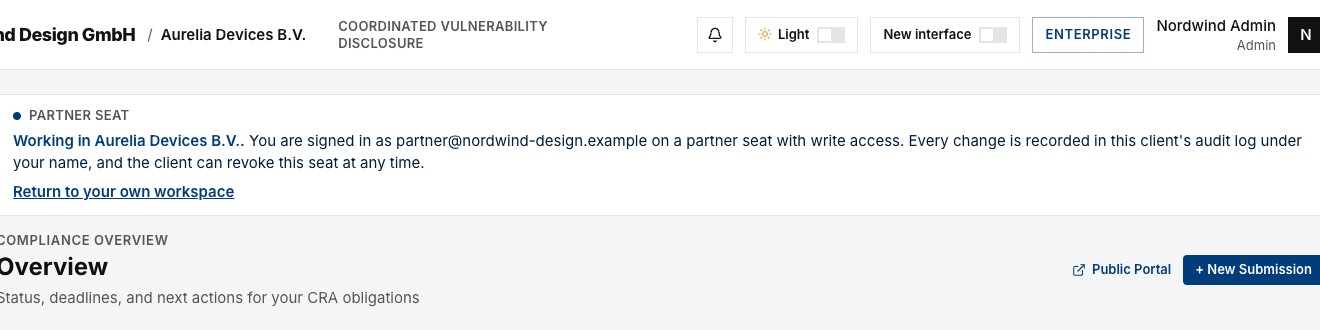
Figure 4. Check the client name and signed-in identity before you make a change.
The client audit log records your changes under your name. The client can revoke your seat. When the client revokes your seat or turns partner access off, the client's data is no longer shown. Reload the page to return to your own workspace. A partner seat cannot change client billing, delete the client account, or change the client's partner access settings.
If the client name is wrong, click Return to your own workspace. Select the correct client before you continue.
If the console shows Access disabled by client, ask the client administrator to review Settings and Partner Access. Resume work after the client authorizes access.
Step 6. Add client documents when required
Use Bulk intake when the client has documents ready for review. Complete account creation and billing checks before you dispatch documents to the client.
- Click
Return to your own workspaceif a partner seat is active. - Click
Bulk intakein the Partner Console. - Click the file selection control under
Step 1. - Select the approved client documents.
- Wait for upload and document reading to complete.
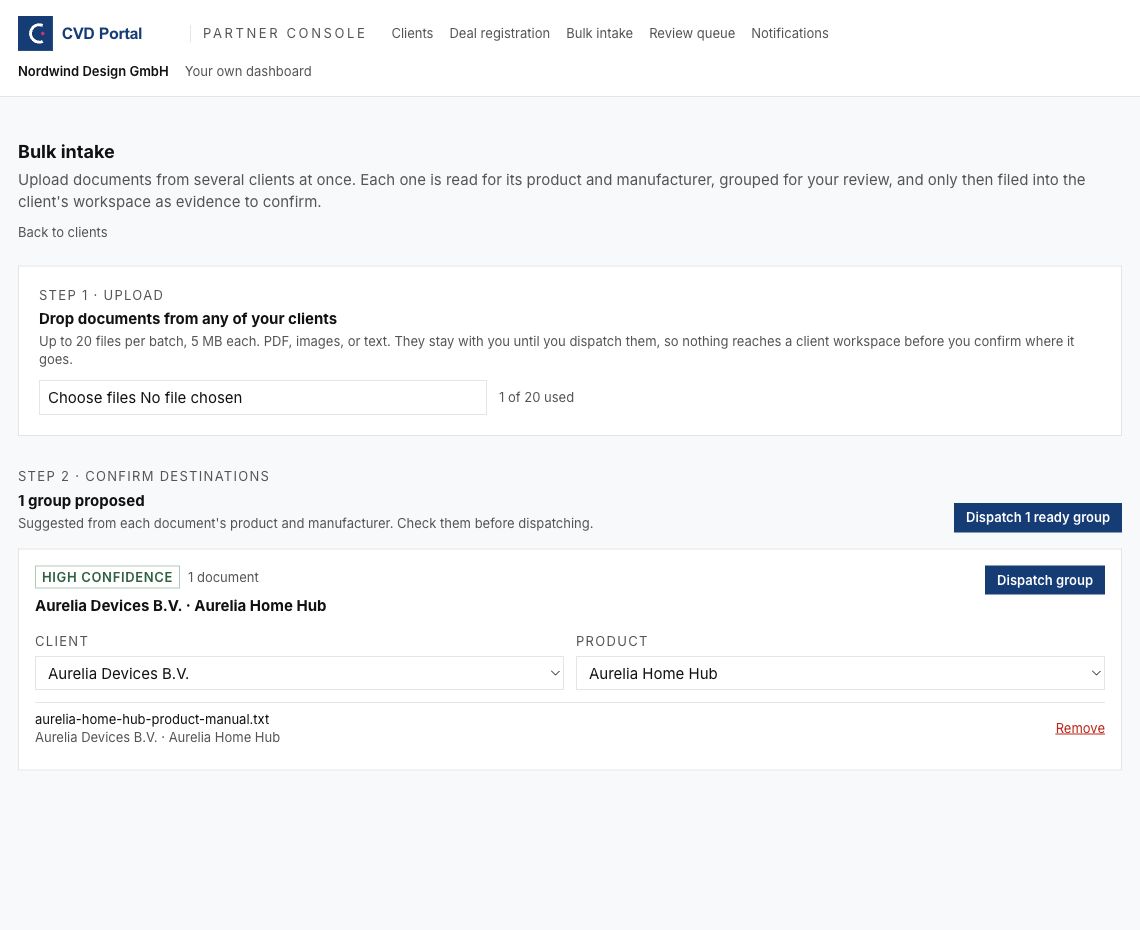
Figure 5. Upload documents in Step 1. Review the suggested destinations in Step 2.
A batch accepts up to 20 files. The upload service accepts PDF, supported image files, and text files up to 15 MB each. The current screen text and the screenshot still state 5 MB. Use files of 5 MB or less when possible to avoid confusion.
Review each group before dispatch.
- Find the group under
Step 2. - Select the correct client in
Client. - Select the correct existing product in
Product. - If a new product is required, select the new product option.
- Enter the approved name in
New product namewhen required. - Check every file name in the group.
- Use the file's move selector if the file belongs to another group.
- Click
Removefor a file that must stay out of the batch. - Click
Dispatch groupafter you confirm the destination. - Check the result under
Filed this session. - Click
Open workspacefor the filed group. - Check the client banner again.
- Review and confirm the draft evidence in the client product.
Selecting a client resets the product selection to a new product. Select the existing product again if required. A high confidence label still requires your review.
Dispatch requires access to technical documentation, such as an active Compliance plan or trial. The system shows a plan error if access is unavailable. Set the agreed plan through the correct billing mode before you retry.
Documents remain in the partner batch until dispatch. Dispatch places documents in the client workspace as draft evidence. Confirm the evidence after review before you use the evidence in the client's technical file.
For the first client, use Dispatch group for each checked group. Use the batch dispatch control only after you have checked all ready groups. If the result reports failed files, check which files were filed before you retry.
Step 7. Set partner notifications
Set notification preferences once for your partner account. The preferences apply across your clients.
- Return to the Partner Console.
- Click
Notifications. - Check the button beside each notification.
- Click
Offto enable a required notification. - Check that the button shows
On.
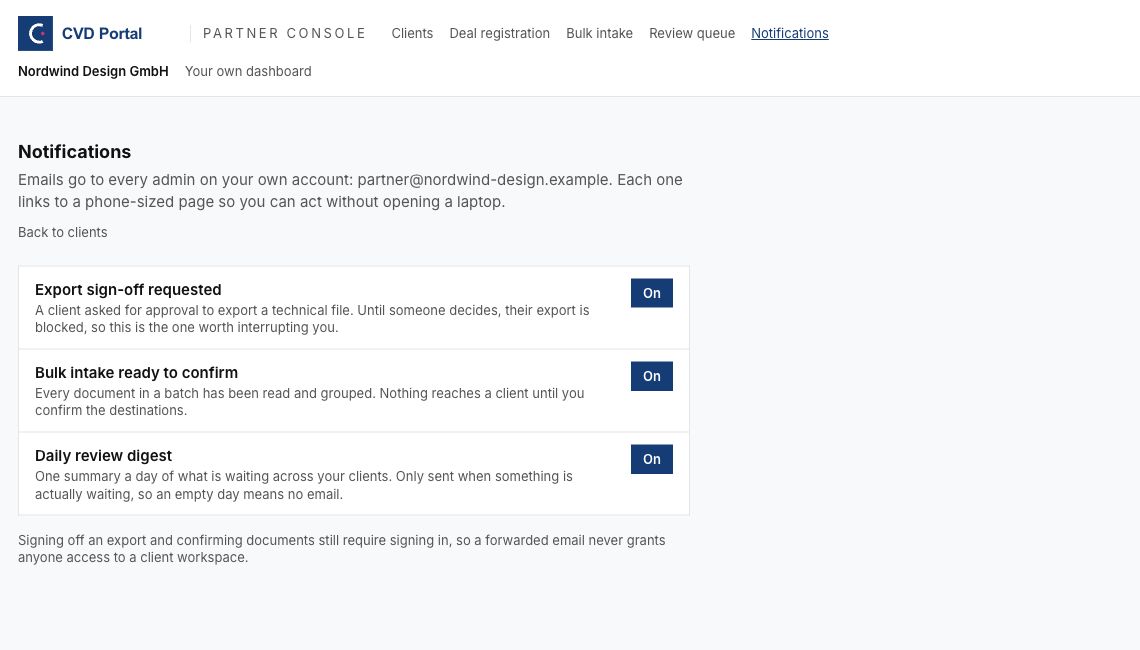
Figure 6. The button shows the current notification setting.
Keep export request and document intake notifications enabled when your team handles those tasks. Use the daily digest to plan work across clients. Notification emails go to partner company administrators. Email links require sign-in.
Common problems and corrective actions
| Problem | Corrective action |
|---|---|
| The client email already has an account. | Ask the client to sign in. Ask support to check the partner link. |
| The client uses a public email provider. | Get the approved client work email. |
| Creation succeeds but no activation email arrives. | Check the spam folder. Use Resend activation email in the client row. |
| An old activation link fails. | Ask the client to use the most recent email. |
| The public portal is closed. | Check whether the client row shows Activation pending. Complete activation. |
| Partner invoicing or tier assignment fails. | Ask support to check wholesale pricing. |
| Work in fails or access is disabled. | Ask the client administrator to check Partner Access. |
| Changes are unavailable after you click Look. | Return to Clients. Use Work in for approved changes. |
| A document points to the wrong client or product. | Correct the destination before dispatch. Check the product again after changing the client. |
| Dispatch reports a plan error. | Check technical documentation access and the agreed client plan. |
| Dispatch reports some failed files. | Review Filed this session. Identify the failed files before you retry. |
Contact CVD Portal support with the screen name and error message if the corrective action fails. Include the affected client workspace name in the private support request. Keep passwords, activation links, and client documents out of the request.
Recommended practices
- Record the approved client administrator email before account creation.
- Agree billing, product scope, and review responsibilities before work starts.
- Use one active client workspace at a time.
- Check the client banner before each change.
- Check the client and product before each document dispatch.
- Use file names that identify the client, product, and document version.
- Ask the client to confirm product information and evidence decisions.
- Record open tasks and the person responsible for each task at handover.
Client handover checklist
Complete the following checks before you close onboarding.
- The client workspace appears under the correct partner account.
- The client administrator has activated the account.
- The client administrator can sign in.
- The billing mode matches the agreement.
- The client plan matches the agreed work.
- The partner has tested Work in and checked the client banner.
- The client knows that changes appear in the audit log.
- The client knows how to revoke partner access in Settings.
- Uploaded documents are in the correct client and product, when applicable.
- Draft evidence has a named reviewer, when applicable.
- The client and partner have agreed the next task and its owner.
After onboarding, follow the partner product compliance manual. The full product procedure is Taking a Product Through CRA Compliance.
Short walkthrough
The existing silent video shows the client list, signup link, and Bulk intake screen. Use the steps above for activation, billing, and handover.